
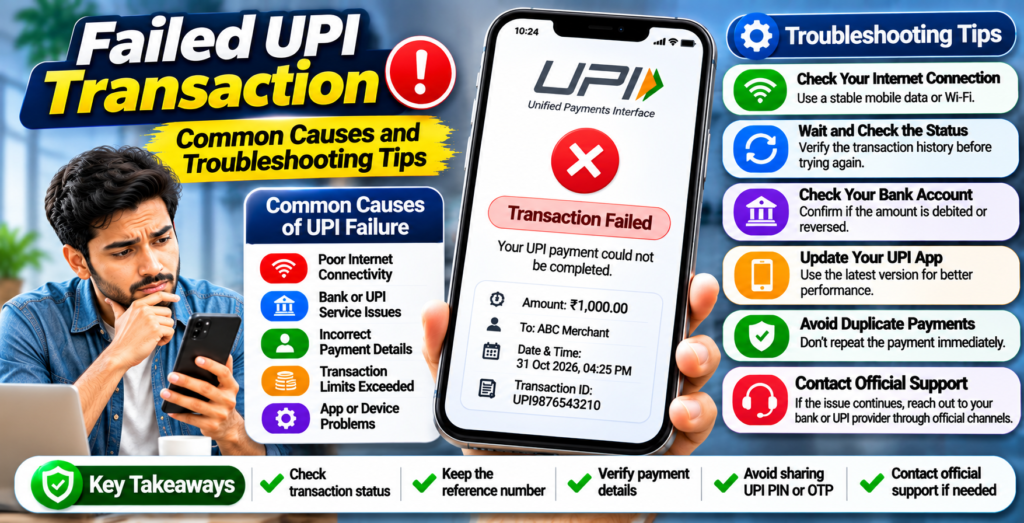
UPI has made digital payments quick and convenient, but transactions can occasionally fail for several reasons. Temporary bank-server issues, unstable internet connectivity, incorrect payment details, transaction limits, or application errors can interrupt the payment process.
If you are dealing with a failed UPI transaction, start by checking the transaction status rather than immediately attempting another payment. Understanding why the transaction failed and whether money was deducted can help you decide what to do next.
What Does a Failed UPI Transaction Mean?
A failed UPI transaction generally means that the payment was not completed successfully. However, the status displayed by your payment application may not always reflect the latest information immediately.
In some cases, a transaction may initially appear unsuccessful while the bank or payment provider is still processing the request. In other situations, money may be debited and subsequently reversed.
Check your UPI application’s transaction history and bank statement before taking further action. If the status is unclear, contact your bank or payment provider through an official channel.
Common Causes of UPI Transaction Failure
1. Internet Connectivity Problems
UPI payments require communication between the payment application, bank, and relevant payment infrastructure. An unstable internet connection can interrupt this process.
If a payment fails, check whether your mobile data or Wi-Fi connection is working normally. Reconnect to a reliable network and review the original transaction status before trying again.
2. Temporary Bank or UPI Service Issues
Banks and payment services may occasionally experience technical difficulties or temporary service interruptions. These issues can prevent a transaction from completing even when your payment details are correct.
If multiple transactions fail despite a stable connection, check for official service updates or contact your bank. Avoid repeatedly attempting the same payment while the original transaction remains unresolved.
3. Incorrect Payment Information
Incorrect recipient details or an incorrect payment amount can lead to payment problems.
Before authorizing a UPI transaction, carefully verify the recipient’s displayed name, payment address, and amount. If the details do not match your intended payment, cancel the transaction rather than proceeding.
Never approve a payment simply because another person pressures you to do so.
4. Transaction Limits
Banks and payment providers may impose transaction limits based on the payment type, account, or applicable security requirements.
A transaction may fail if an applicable limit has been reached. Check your bank’s official guidance for current limits and restrictions rather than relying on outdated information from unofficial websites.
5. Outdated Applications or Device Problems
An outdated payment application or operating system can sometimes cause compatibility issues. Temporary application errors may also prevent transaction details from displaying correctly.
Check for updates through the official application store or your device’s settings. Restarting the application or device may help with minor technical issues.
However, updating an application does not automatically resolve a transaction that is already pending or under review.
What If Money Was Deducted From Your Account?
If your bank account shows a debit but your UPI application displays a failed transaction, do not immediately make the same payment again.
Follow these steps:
- Open your official UPI or banking application.
- Review the original transaction’s status.
- Check your bank statement to see whether the amount was debited or returned.
- Save the transaction reference number, date, and amount.
- Contact your bank or payment provider if the status remains unresolved.
The time required to resolve a transaction can vary depending on the payment method and the institutions involved. Follow the guidance provided by your bank and retain any relevant complaint or service-request number.
How to Avoid Duplicate UPI Payments
Repeatedly attempting a payment without checking the original transaction can create confusion and may lead to duplicate payments.
Before initiating another transfer, confirm whether the first transaction was successful, failed, reversed, or is still pending.
If the recipient has not confirmed receiving the money, check the transaction history and consult your bank or payment provider when necessary. Do not rely solely on screenshots or messages provided by another person as proof of payment.
Protect Your Information During Troubleshooting
Be cautious of people who claim they can instantly fix failed UPI transactions or arrange refunds.
Never share your UPI PIN, OTP, card PIN, CVV, banking password, or other confidential authentication details with someone claiming to provide support. Avoid installing unknown applications or granting remote access to your device at an unsolicited caller’s request.
Use only verified support channels provided by your bank or payment service.
Frequently Asked Questions
1. Why did my UPI transaction fail?
Common reasons include poor internet connectivity, temporary bank-service issues, incorrect payment details, transaction limits, or application errors.
2. Should I retry a failed UPI payment immediately?
First, check the original transaction’s status. If the status is unclear or the payment is still being processed, confirm the outcome before attempting another transfer.
3. What should I do if money was deducted?
Review your bank statement and transaction history, save the reference number, and contact your bank or payment provider if the transaction remains unresolved.
4. Can poor internet connectivity cause UPI failure?
Yes. An unstable connection can interrupt communication during a transaction or prevent the application from displaying an updated status.
5. Can an outdated UPI application cause payment problems?
It can contribute to compatibility or technical issues. Keep the application updated through an official source.
6. Should I share my UPI PIN with customer support?
No. Your UPI PIN is confidential and should never be disclosed to another person.
7. What is a UPI transaction reference number?
It is an identifier associated with a transaction that can help your bank or payment provider locate and investigate the payment.
8. How can I reduce failed UPI transactions?
Use a reliable internet connection, verify recipient details, keep your payment application updated, and check the original transaction status before repeating a payment.