
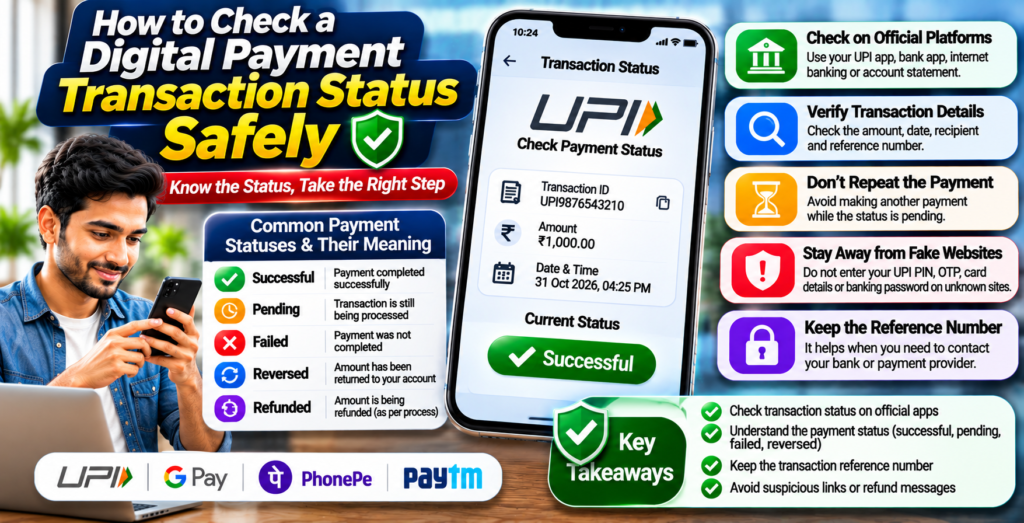
Digital payments have made transferring money convenient, but transactions can sometimes display statuses such as successful, pending, failed, reversed, or refunded. Understanding these statuses helps you decide what to do next and reduces the risk of duplicate payments or unnecessary confusion.
If you need to check a payment transaction status, always start with your official banking or payment application. Avoid relying on unfamiliar websites, suspicious messages, or people claiming they can instantly resolve payment issues.
1. Why Should You Check Your Transaction Status?
A payment may appear unsuccessful on one screen while the bank or payment network is still processing the transaction. In other cases, the payment may have failed, or the amount may have been returned to your account.
Checking your official transaction history helps you understand whether the payment was completed or requires further investigation.
This step is especially important before attempting another payment, as repeating a transaction without confirming its original status could result in duplicate payments.
2. Where Can You Check Your Payment Status?
The safest place to begin is the official UPI or payment application you used to make the transaction.
You can also check your transaction through:
- Your bank’s official mobile application.
- Your bank’s internet banking service.
- Your account statement.
- The verified support channel of your bank or payment provider.
Open your transaction history and select the relevant payment to review its available details. The exact steps and information displayed may vary depending on the application and payment method.
3. Understand Common Payment Statuses
Knowing what each status generally means can help you determine the appropriate next step.
Successful
A successful status generally indicates that the payment has been completed according to the payment system. Check the recipient details and transaction record to confirm that it matches the payment you intended to make.
Pending
A pending status means the transaction has not yet reached a confirmed final outcome. It may still be undergoing processing or awaiting confirmation.
Avoid immediately repeating the payment. Check your transaction history and bank account before taking further action.
Failed
A failed status generally indicates that the payment was not completed successfully. However, if money was deducted, check whether it has been reversed before attempting another payment.
Reversed or Refunded
A reversed transaction generally indicates that the payment amount has been returned or is being returned to the original payment source. A refund may follow a separate process, depending on the payment type.
Status labels and processing times can vary between banks and payment providers. Consult the relevant institution if the final outcome is unclear.
4. Verify the Transaction Amount and Date
When checking a payment, carefully review the available transaction details.
Confirm the following information:
- Transaction amount.
- Date and time.
- Recipient or merchant details.
- Payment status.
- Transaction reference number.
These details help you identify the correct payment, particularly if you have made multiple transactions within a short period.
If the recipient details or amount do not match your intended transaction, contact your bank or payment provider through an official channel.
5. Keep Your Transaction Reference Number Safe
A transaction reference number can help your bank or payment provider locate a payment when investigating a problem.
Keep the reference number along with the transaction date, amount, and status. These details can be useful when submitting a complaint or requesting an update.
Avoid posting transaction information publicly on social media. Share relevant details only through legitimate support channels, and never disclose your UPI PIN, OTP, banking password, card PIN, or CVV.
6. Avoid Fake Payment-Status Websites
Some fraudulent websites and messages claim to provide payment verification, instant refunds, or transaction recovery services.
Be cautious if a website asks you to enter confidential banking information or install an unfamiliar application to check a payment.
For your security:
- Use official banking and payment applications.
- Verify website addresses before entering personal information.
- Never share your OTP or UPI PIN with another person.
- Avoid installing unknown applications at the request of an unsolicited caller.
- Contact your bank directly if you suspect fraud.
A legitimate transaction-status check should not require you to disclose confidential authentication credentials to an unknown person.
7. What to Do If Your Payment Is Still Pending
If a transaction remains pending, first check whether the amount has been debited from your bank account.
Review the original transaction and allow the relevant payment process to complete according to your bank’s guidance. Avoid initiating another payment until the original transaction’s outcome is clear.
If the status remains unresolved, contact your bank or payment provider through its official support process. Provide the transaction reference number and other relevant details when requested.
8. What If Money Was Deducted but the Payment Failed?
If your bank statement shows a debit but the payment status indicates failure, keep the transaction reference number and review your account activity.
Check whether the amount has been returned or reversed. If the issue remains unresolved, report it to your bank or payment provider and follow its instructions.
Do not trust anyone promising an instant refund in exchange for an OTP, UPI PIN, or remote access to your phone.
Frequently Asked Questions
1. How do I check a payment transaction status?
Use the official UPI or payment application, your bank’s mobile application, internet banking service, or account statement to review the transaction.
2. What does a pending payment status mean?
It means the transaction has not yet reached a confirmed final outcome. Check the transaction history and follow your bank’s guidance.
3. Should I repeat a pending transaction?
Avoid repeating the payment until you understand the status of the original transaction. This can help reduce the risk of duplicate payments.
4. What does a successful payment status mean?
It generally indicates that the transaction has been completed according to the payment system. Review the transaction details to confirm that it matches your intended payment.
5. What does a reversed payment mean?
It generally indicates that the transaction amount has been returned or is being returned to the original payment source.
6. Can I check payment status through an unknown website?
Avoid unfamiliar websites that request sensitive information. Use official banking and payment channels instead.
7. Should I share my OTP to confirm a payment?
No. OTPs are confidential authentication codes and should never be shared with another person.
8. What information should I keep when reporting a payment problem?
Keep the transaction date, amount, status, and reference number available. Share relevant details only through your bank’s or payment provider’s legitimate support channel.